
The Text Snippets tool lets you save and reuse commonly used text, such as contact information, calls-to-action, or hashtags. Now you can stay consistent with your messaging and in control of your social media.
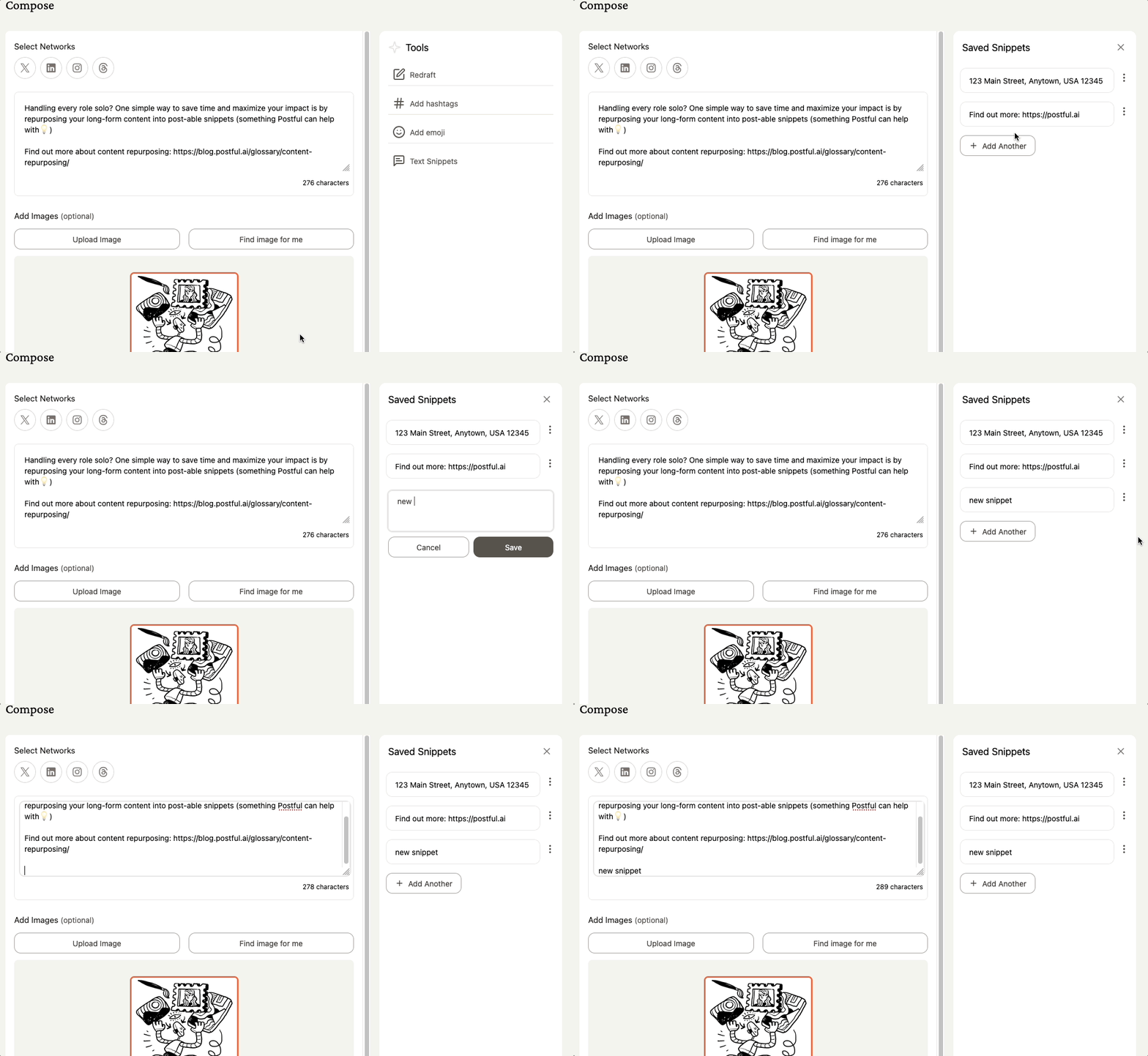
Adding text snippets #
- In the Compose page, click Text Snippets.
- Select Add Snippet or Add Another once you have saved snippets.
- Enter the text you want to save.
- Click Save (or Cancel if you don’t want to keep it).
Using a saved snippet #
- In the Compose page, open the Tools panel and click Text Snippets.
- Browse your saved snippets and select the one you want.
- Clicking the snippet is copies it to your clipboard.
- Paste it into text editor wherever you want to use it.
Additional Notes #
Some suggested uses for Text Snippets:
- Frequently used hashtags
- Contact and location information (e.g. phone, email address, physical address)
- Business hours
- Calls-to-action (e.g. “sign up today”)
- Upcoming event details
- Special promotions (e.g. coupon or discount codes, sales)
- Links or references to link-in-bio
- Common formatting (e.g. list templates, vertical spacers, emoji sets)
- And more!